
Appearance
Session Values
Session Values allow you to extract data from a connector's API response during one action and reuse it in subsequent actions within the same endpoint. This is essential for APIs that require multi-step workflows where later requests depend on identifiers or tokens returned by earlier ones.
A common example is the Shopify Order Edit API, where you must first begin an edit session to obtain a calculatedOrder ID, then reference that ID when committing line item changes.
When to Use Session Values
Use a Get Session Values action when your integration needs to:
- Extract an identifier from an API response and pass it to a later save action (e.g. Shopify's
calculatedOrder.id) - Map response list items to child entities by matching on a shared property (e.g. matching Shopify line items to Order Lines by SKU)
- Chain API calls where the second call requires data returned by the first
Overview: Shopify Order Line Edits
Shopify's Order Edit API follows a begin/commit pattern:
- Begin Edit —
POST /orders/{id}/edits/begin.jsonreturns anorderEditobject containing acalculatedOrderwith anidand itslineItems - Modify Lines — Use the
calculatedOrder.idto add, remove, or update line items - Commit Edit —
POST /orders/{id}/edits/{calculatedOrderId}/commit.jsonfinalizes the changes
Session Values bridge step 1 and step 3 by extracting the calculatedOrder.id from the begin response and making it available as a mappable property in the commit action.
Adding a Get Session Values Action
Within an endpoint's Data Source tab, select On Save from the sidebar to view the save action tree.
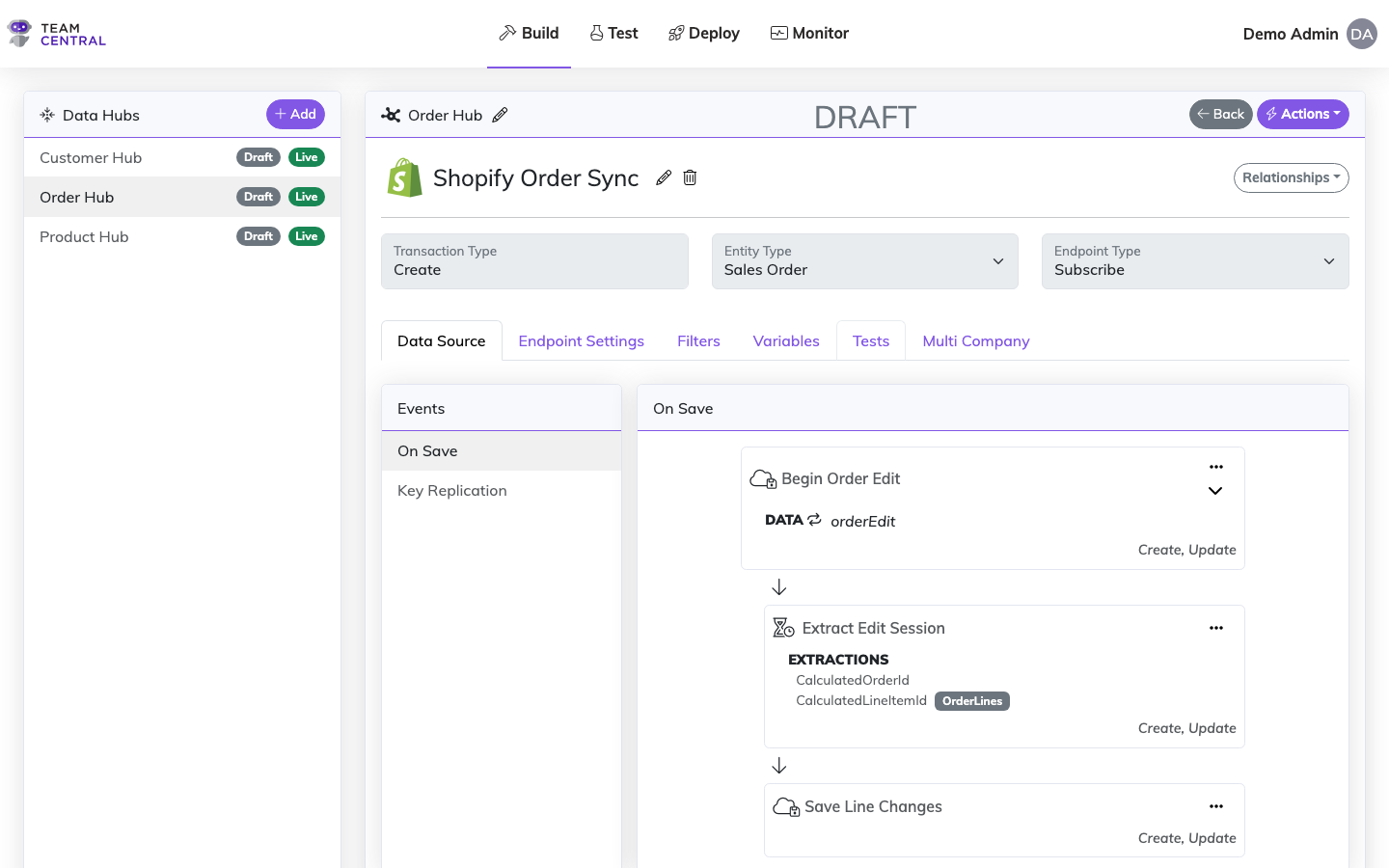
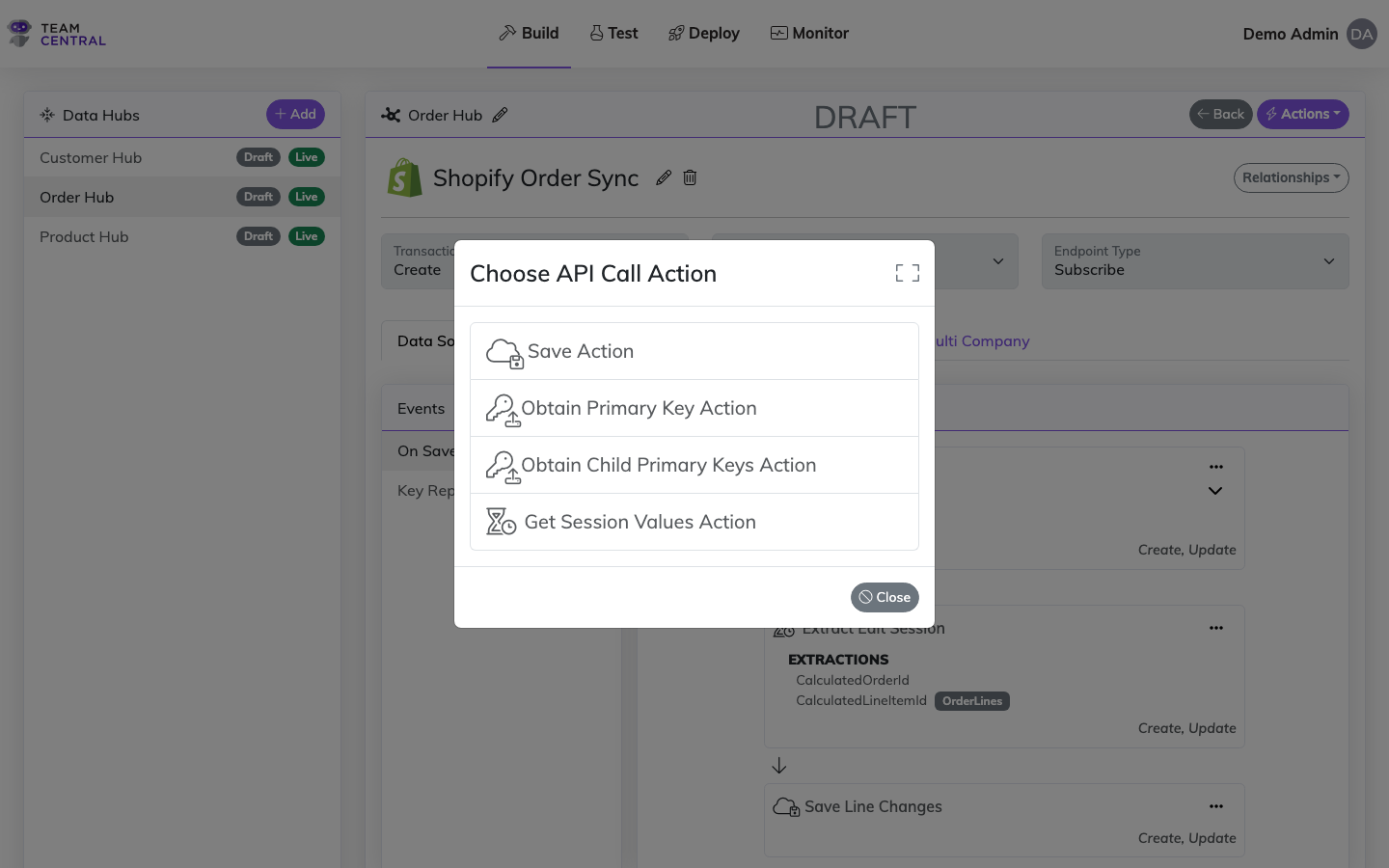
To add a new Get Session Values action:
- Click the ... menu on the parent save action card
- Select Add Action
- Choose Get Session Values Action from the list
Configuring Extractions
Click the ... menu on a Get Session Values action card and select Edit to open the configuration form.
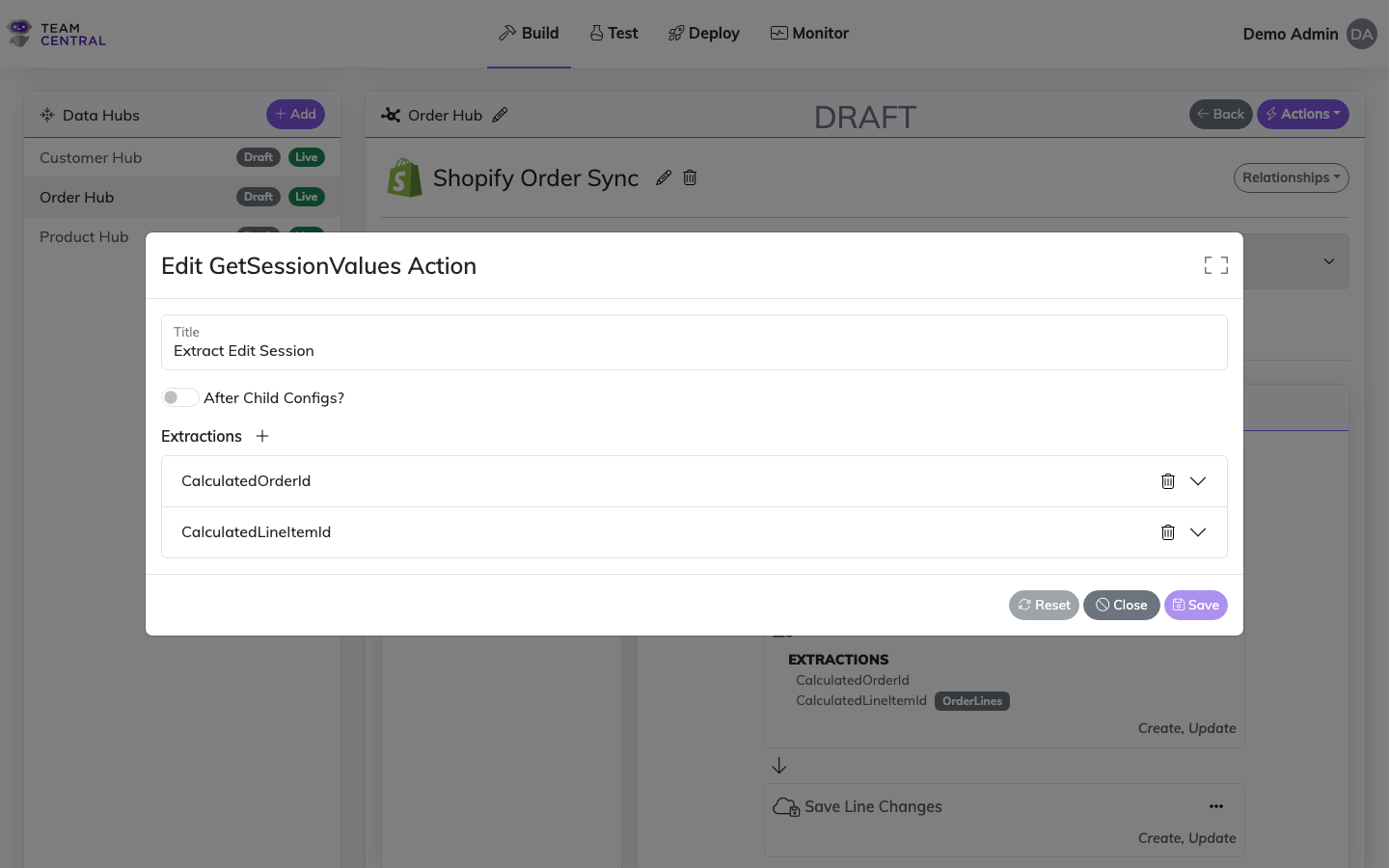
Each Get Session Values action contains one or more extractions. An extraction defines how to pull a value from the connector's API response and make it available to subsequent actions.
Basic Extraction (Header-Level Value)
Use a basic extraction to capture a single value from the API response, such as the calculatedOrder.id:
| Field | Description | Example |
|---|---|---|
| Model Property | The name this value will be known by in property mappings | CalculatedOrderId |
| Connector Property | The JSON path in the API response to extract from | calculatedOrder.id |
Once configured, CalculatedOrderId becomes available as a Session Value in the property picker for all subsequent actions. You can use it in save URLs (e.g. /orders/{OrderNumber}/edits/{CalculatedOrderId}/commit.json) or in property mappings.
Collection Extraction (Map to Children)
Enable the Map to Children toggle when the API response contains a list that needs to be matched to child entities. For example, mapping Shopify's calculatedOrder.lineItems to your Order Lines:
| Field | Description | Example |
|---|---|---|
| Model Property | The child property to populate | LineItemId |
| Connector Property | The JSON path for the value to extract from each list item | calculatedOrder.lineItems.id |
| Target List | The child entity list to map into | OrderLines |
| Model Match Property | The child entity property to match on | SKU |
| Connector List Property | The JSON path to the list in the response | calculatedOrder.lineItems |
| Connector Match Property | The list item property to match against the model | sku |
This tells the engine: "For each item in calculatedOrder.lineItems, find the Order Line whose SKU matches the item's sku, and set that Order Line's LineItemId to the item's id."
Multiple Lists Extraction
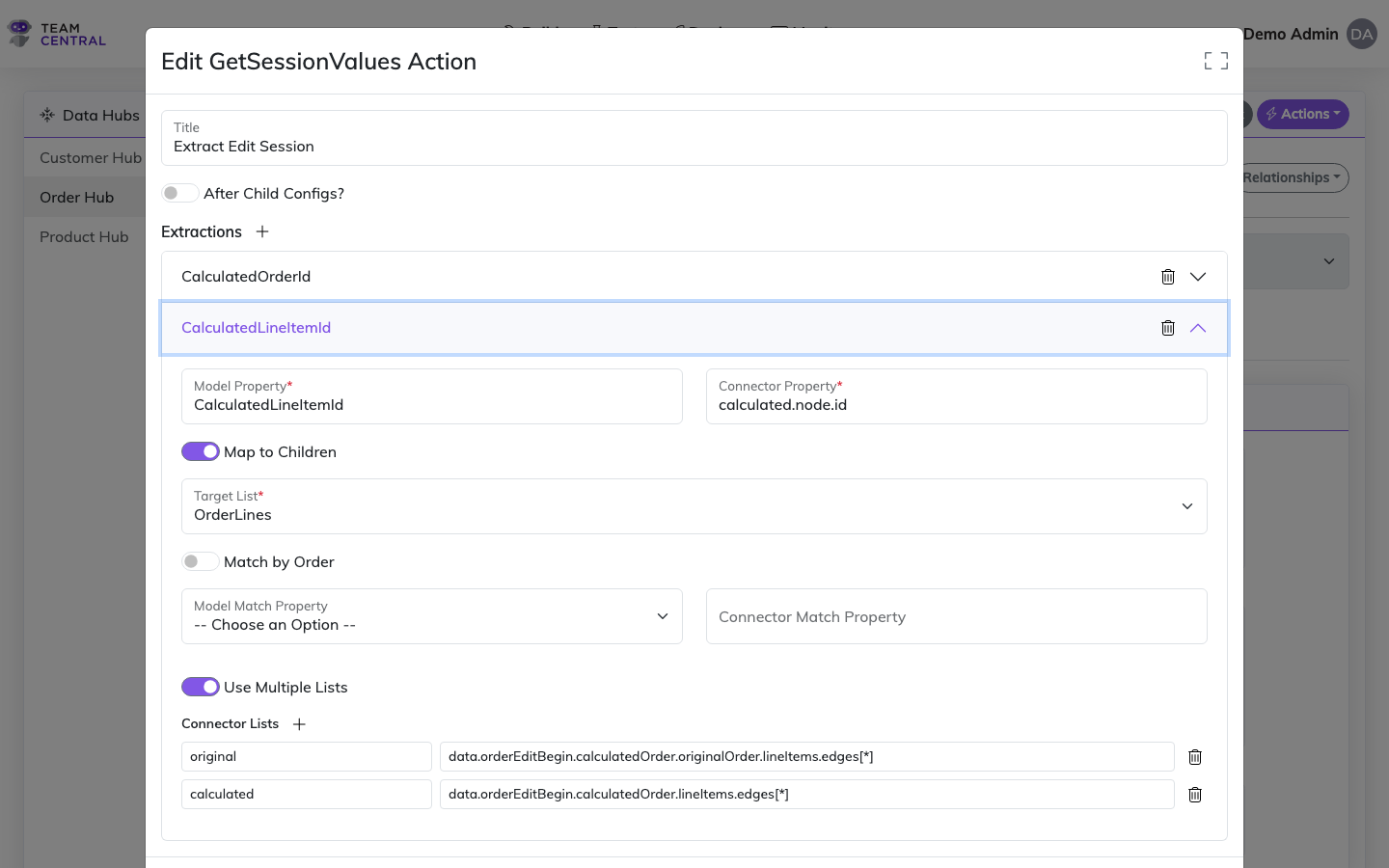
Some APIs return two or more parallel lists in the same response with no cross-reference between them. For example, Shopify's orderEditBegin mutation returns both originalOrder.lineItems.edges and calculatedOrder.lineItems.edges — the calculated list has the IDs you need, but contains no pointer back to the original line items.
Enable the Use Multiple Lists toggle to correlate items from separate lists by their position (index). Each list is given a user-chosen prefix that becomes a namespace in the connector property paths.
| Field | Description | Example |
|---|---|---|
| Model Property | The child property to populate | CalculatedLineItemId |
| Connector Property | Path to the value to extract, prefixed by list name | calculated.node.id |
| Target List | The child entity list to map into | LineItems |
| Model Match Property | The child entity property to match on | Id (PrimaryKey) |
| Connector Match Property | Path to the match value, prefixed by list name | original.node.id |
| Connector Lists | A set of prefix → list path pairs | See below |
Connector Lists Configuration
Each row in the Connector Lists editor maps a prefix name to a JSON path:
| Prefix | Path |
|---|---|
original | data.orderEditBegin.calculatedOrder.originalOrder.lineItems.edges[*] |
calculated | data.orderEditBegin.calculatedOrder.lineItems.edges[*] |
At runtime the engine resolves both lists, zips them by index, and constructs a composite object per position:
json
{
  "original": { "node": { "id": "gid://shopify/LineItem/15810547548386", ... } },
  "calculated": { "node": { "id": "gid://shopify/CalculatedLineItem/15810547548386", ... } }
}
The Connector Match Property (original.node.id) is evaluated against this composite to find the matching child entity, and the Connector Property (calculated.node.id) extracts the value to store as a session value on that entity. Downstream actions can then reference {SESSION:CalculatedLineItemId} in URL templates or property mappings.
WARNING
All lists in a multiple-list extraction must have the same number of items. If the lengths differ, the extraction is skipped and a warning is logged.
Execution Order
Session Values respect the action execution order within the action tree:
- Pre-child actions run first (in array order) — this is where Get Session Values should typically be placed
- Child config saves run next
- Post-child actions run last (actions with "After Child Configs?" enabled)
A Get Session Values action can only reference values from actions that execute before it. The visual action tree shows a Child Saves separator when post-child actions are present, making the execution boundary clear.
After Child Configs?
Enable the After Child Configs? toggle on a Get Session Values action if you need to extract values from an API call that runs after child entities have been saved. This is uncommon but useful when a parent API call depends on child data being committed first.
Using Session Values in Property Mappings
Once a Get Session Values action is configured, the extracted values appear automatically in the Central Property picker under a Session Values group. This means you can select them just like any other property when building request or response mappings.
Session values are scoped to the Data Model they target:
- Header-level extractions (no "Map to Children") appear in the parent entity's property picker
- Collection extractions (with "Map to Children") appear in the child entity's property picker, scoped to the target list's Data Model
Example: Complete Shopify Order Edit Flow
Here is how the full save action tree looks for a Shopify order line edit integration:
| Action | Type | Purpose |
|---|---|---|
| Begin Order Edit | EndpointSave (root) | Calls POST /orders/{id}/edits/begin.json |
| → Extract Edit Session | GetSessionValues | Extracts CalculatedOrderId and maps LineItemId to Order Lines |
| — Child Saves — | Child endpoints save their line item changes | |
| → Save Line Changes | EndpointSave (after children) | Calls POST /orders/{id}/edits/{CalculatedOrderId}/commit.json |
The key insight is that CalculatedOrderId is extracted once by the Get Session Values action, then referenced by the commit action's URL template — without needing to hard-code or manually pass the value between steps.
Using Multiple Lists for Disconnected Responses
When the API response contains disconnected parallel lists (like Shopify's GraphQL orderEditBegin mutation which returns both originalOrder.lineItems and calculatedOrder.lineItems with no cross-reference), the Extract Edit Session action uses a multiple-lists extraction:
| Extraction | Type | Config |
|---|---|---|
CalculatedOrderId | Scalar | Connector Property: data.orderEditBegin.calculatedOrder.id |
CalculatedLineItemId | Multiple Lists | Match on original.node.id → extract calculated.node.id |
The multiple-lists extraction correlates the original and calculated line item arrays by position, matches each original line item to the corresponding child entity, and stores the calculated line item ID as a session value — which is then available as {SESSION:CalculatedLineItemId} in the orderEditSetQuantity mutation.
See Also
- Endpoint Configuration — Configure endpoint action inputs and parameterization
- Action Mapping — Map endpoint actions to Common Model properties
- Data Adaptation — Transform data during reads and writes
- Endpoint Relationships — Configure child endpoints and dependent publishers