
Appearance
Related Data
Related Data is a mechanism that allows properties from related entities to be included alongside the primary entity during synchronization events. Rather than only syncing the direct properties of an entity (e.g. a Sales Order's own fields), Related Data lets you carry forward attributes from linked entities (e.g. the Customer's name or a Location's address) so that subscribing systems have the context they need without performing separate lookups.
How It Works
When an entity is published through Central, it carries a collection of Related Data items alongside its own properties. Each item is identified by three attributes:
| Attribute | Description |
|---|---|
| Name | The Common Name or property name of the data (e.g. CompanyName, LocationCode) |
| System | The source system the value originated from (e.g. SystemA, SystemB) |
| Related Key Name | The foreign key relationship this data was resolved through (e.g. CompanyId, LocationId). When blank, the data belongs to the entity itself. |
This three-part key means the same property name can exist multiple times in an entity's related data — once per source system and relationship — without conflict.
Example
A Sales Order entity might carry the following related data:
| Name | System | Related Key Name | Value |
|---|---|---|---|
CompanyName | ERP-A | CompanyId | Acme Corp |
CompanyName | CRM-B | CompanyId | ACME Corporation |
LocationCode | ERP-A | LocationId | WH-01 |
Each value is tagged with the system it came from and the foreign key it was resolved through.
Accumulation During Sync
Related Data is accumulated automatically during the sync pipeline. When Central resolves foreign key relationships for an entity, it copies relevant properties from the related core entities into the Related Data collection:
Foreign key resolution — Central looks up the core entity referenced by each foreign key on the integration entity (e.g. resolving a
CompanyIdto a Company record).Property copying — Properties marked as Related Data on the related entity's Data Model are copied into the current entity's Related Data collection, tagged with the foreign key name they came from.
Extra key accumulation — If the related entity has Extra Primary Keys, those are also accumulated as Related Data items so subscribing systems can use alternate identifiers.
Cascading to children — When an entity has child endpoints, the parent's Related Data (from its own properties, not from other relationships) is cascaded down to child entities, tagged with the parent's foreign key name.
TIP
Related Data accumulation is automatic once properties are flagged. You do not need to write custom code or configure additional pipeline steps — just mark the properties and map them.
Configuring Related Data
There are two places where Related Data is configured: Data Models (which properties to include) and Action Mapping (how to map them to connector payloads).
1. Flagging Properties in Data Models
To make a property available as Related Data for other entities:
- Navigate to Build > Data Models and edit the Data Model that owns the property.
- On the Simple tab, select the edit icon for the property you want to include.
- Toggle Related Data to ON, then select Save.
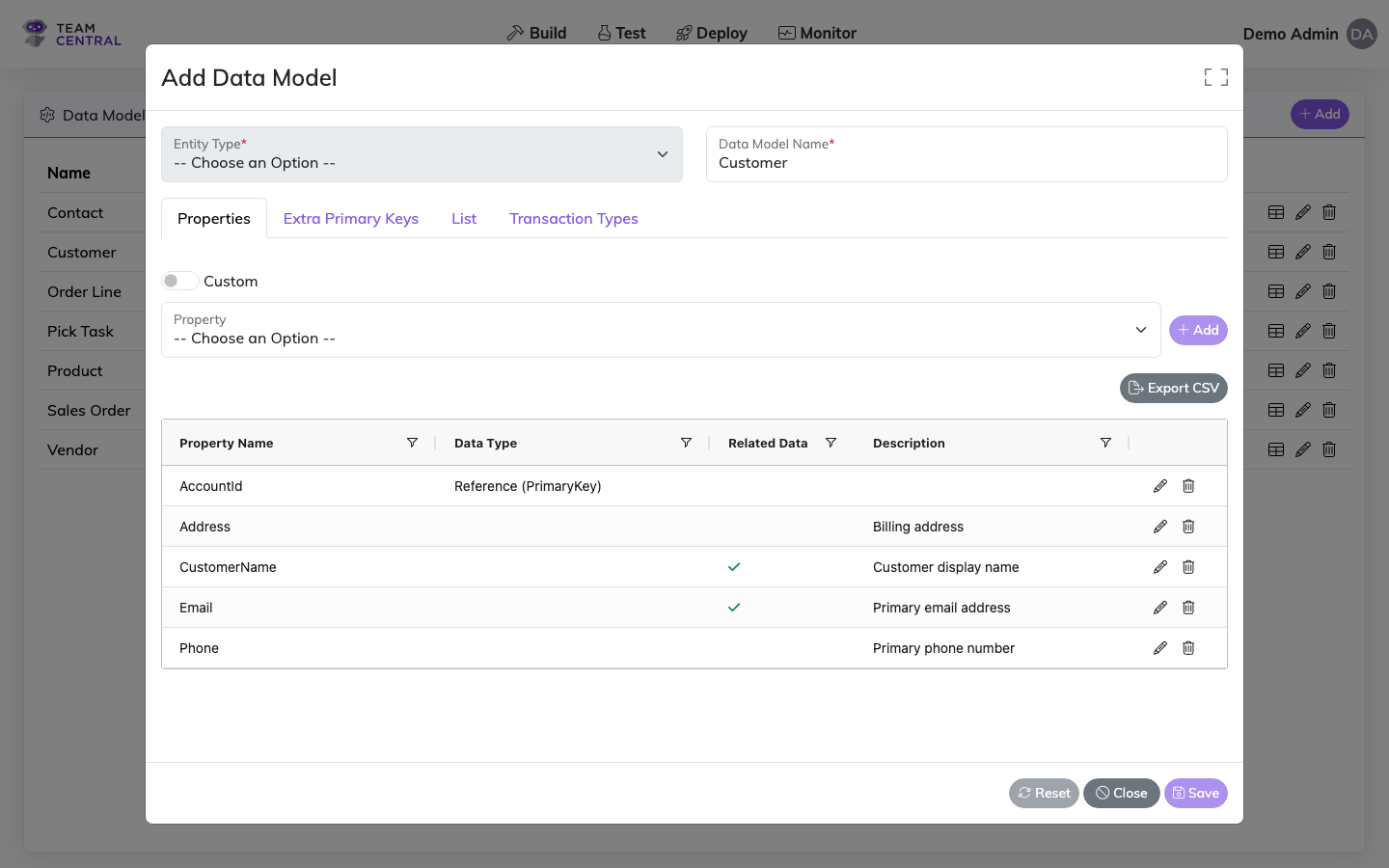
Once enabled, this property will be accumulated into any entity that has a foreign key relationship pointing to this Data Model's entity type. The Related Data flag appears as a green checkmark () in the property grid.
For more details on editing properties, see Data Models.
2. Mapping Related Data Properties
When mapping an endpoint action (typically a save/subscribe action), Related Data properties appear as selectable options in the Central Property picker alongside the entity's own properties.
Related Data properties are displayed with a label indicating the relationship they come from:
CompanyName (From CompanyId)
This tells you the CompanyName value is resolved through the entity's CompanyId foreign key.
To map a Related Data property:
- Navigate to the endpoint's Action Mapping screen.
- Add or edit a map element.
- In the Central Property picker, look for properties grouped under their source relationship. These are the Related Data properties accumulated from related entities.
- Select the desired property — the mapping engine will read the value from the entity's Related Data collection at sync time.
WARNING
Related Data properties are available in save/subscribe actions only. They do not appear in read/publish actions because the data has not yet been accumulated at that point in the pipeline.
For more details on action mapping, see Action Mapping.
When to Use Related Data
Best Practice
Use Related Data when a subscribing system needs context from a related entity that it cannot look up on its own.
Common scenarios:
- Denormalized saves — A target system expects the customer name on the sales order payload, not just the customer ID. Map the
CompanyNameRelated Data property directly onto the connector's save payload. - Alternate identifiers — A target system uses a different ID for the same entity. Extra Primary Keys from the related entity are accumulated as Related Data, so you can map the alternate ID without a separate lookup.
- Cascading context — Child entities (e.g. order lines) need access to parent-level attributes (e.g. order type, warehouse code). The parent's Related Data is cascaded to children automatically.
When NOT to use Related Data:
- If the subscribing connector can resolve the reference itself (e.g. it only needs the foreign key ID), a standard Foreign Key mapping is sufficient.
- If the data is specific to the current entity (not from a relationship), use a regular Property mapping instead.
See Also
- Data Models — Define schemas and flag properties as Related Data
- Action Mapping — Map Related Data properties to connector payloads
- Endpoint Relationships — Configure parent/child and dependent publisher relationships
- Common Model Definitions — Central Property definitions used in Data Model mapping