
Appearance
Endpoint Configuration
This section covers how to edit endpoint configurations, the inputs required for each event type, and how to parameterize URLs, bodies, and file names.
Edit Endpoint Configurations
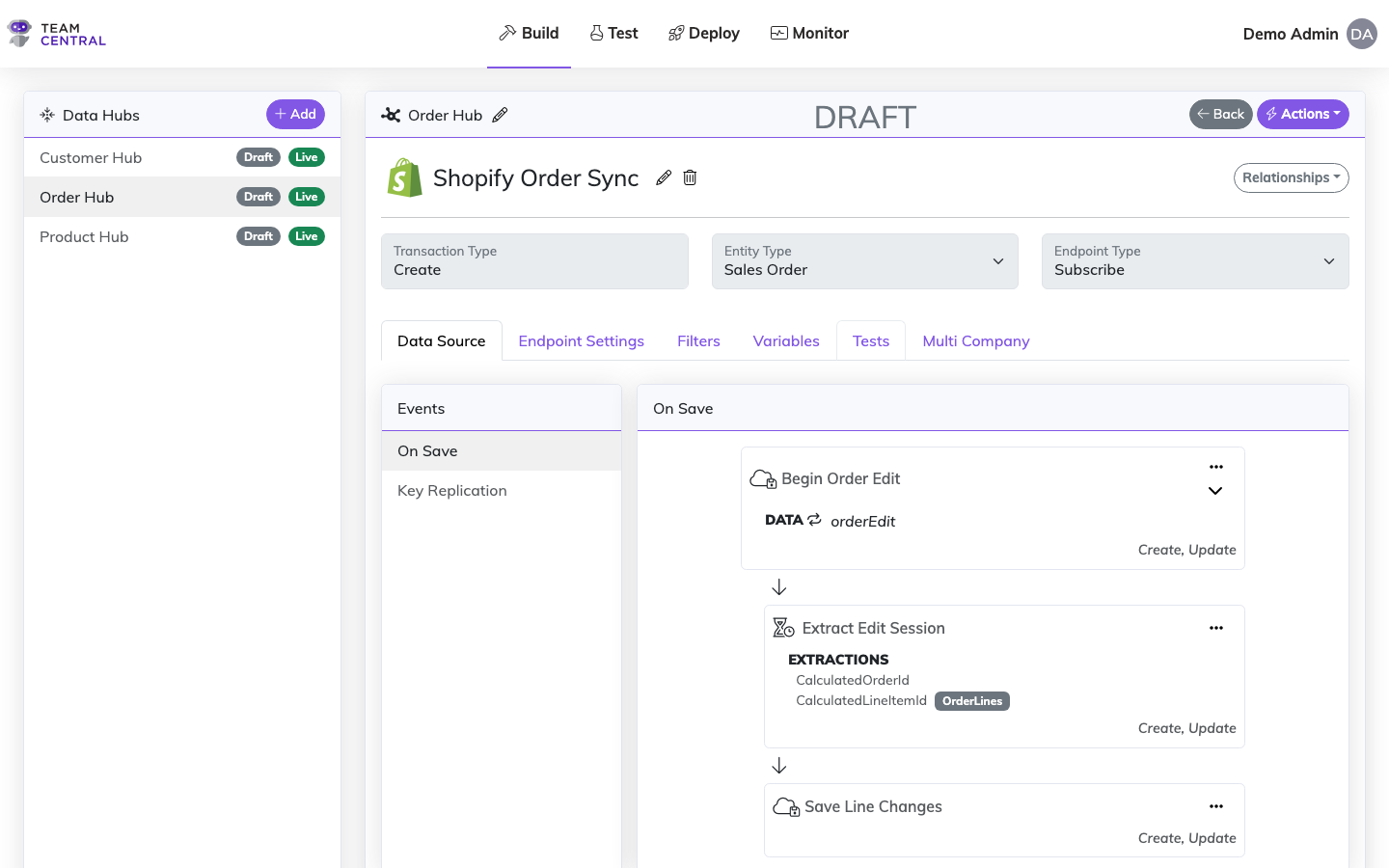
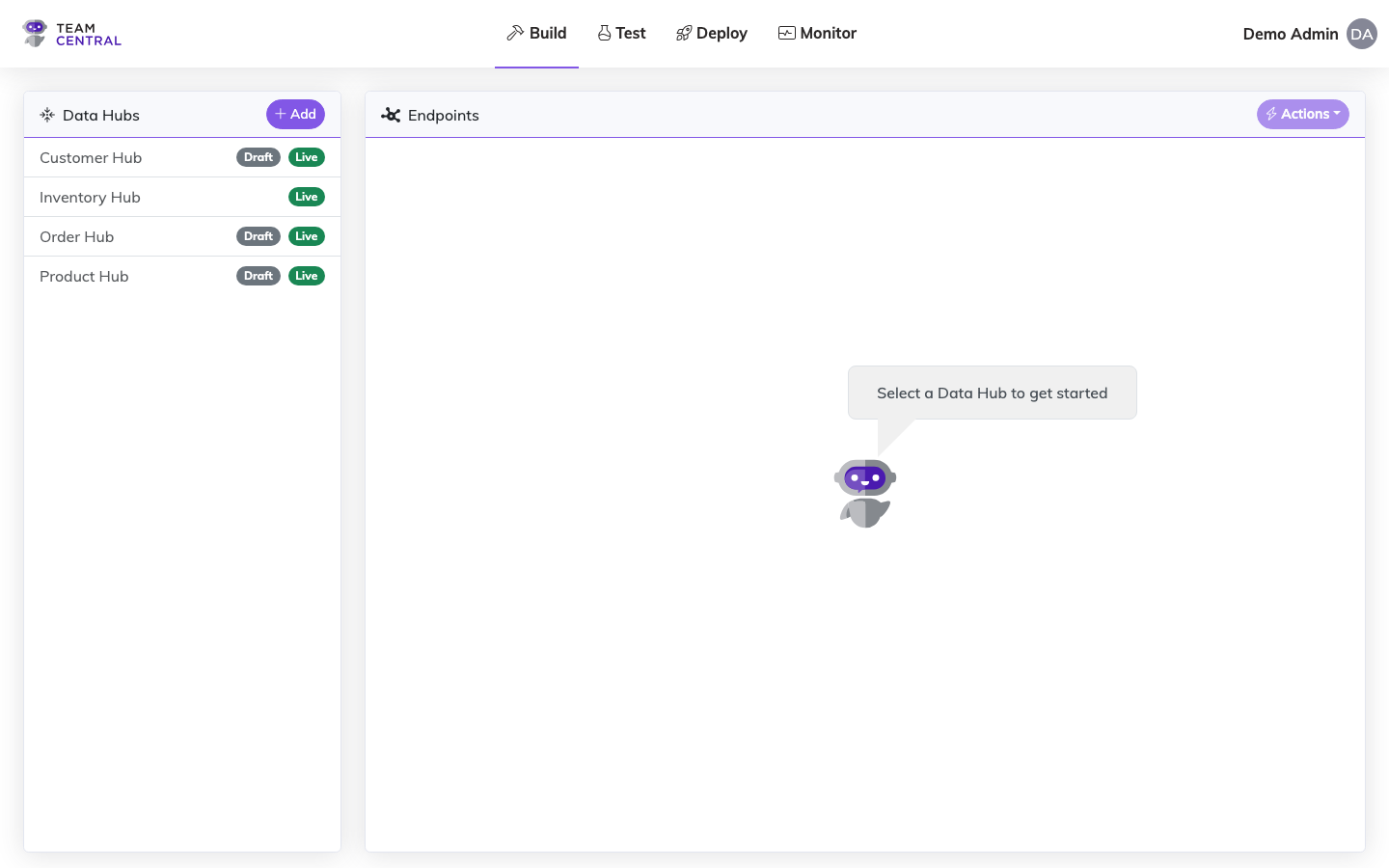
Select Build > Data Hubs from the main menu.
Select the appropriate Data Hub (A); then, select an Endpoint (B) to edit.
Ensure the Data Source tab (C) is selected.
Select the appropriate Events tab (D) from the left column.
Select the menu icon > Edit (E).
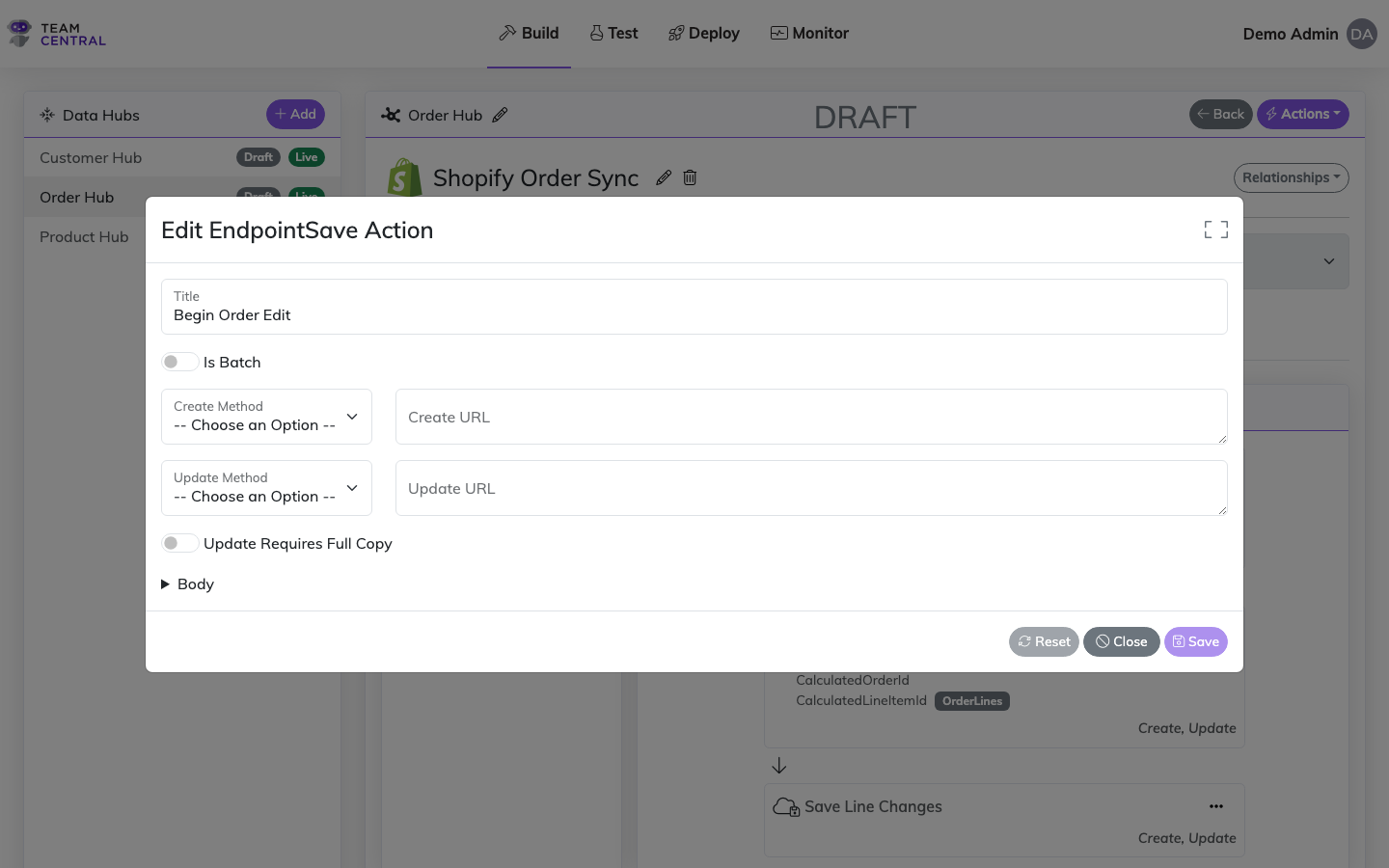
Re-configure the Endpoint Action (F) as needed.
NOTE
The data required to configure an Endpoint Action is dependent on the action assigned (i.e. API Read, SQL Save, File Read, etc.). See the Endpoint Event Inputs section below for detailed descriptions on each protocol.
- For Read Actions, you can use the Test Request button in the modal footer to test the action directly without saving. This opens the Test Connector modal with the request pre-populated from your current configuration.
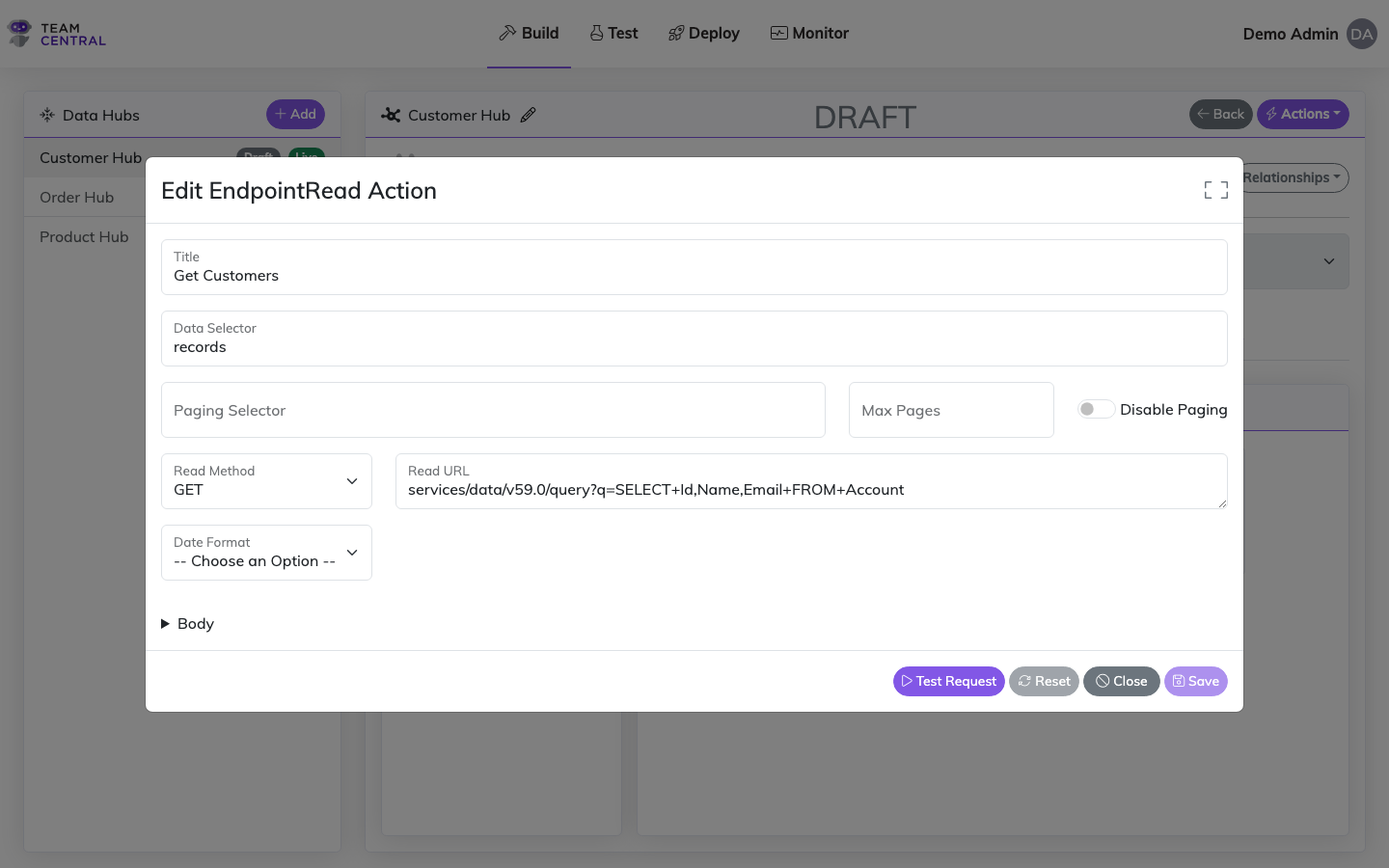
- When finished, select Save (G).
NOTES
- You will need to configure each Endpoint Action created (e.g. if Both was selected as the Endpoint Type, then you'll need to configure the Endpoint Action for both the On Save and Get Changes events).
- When a save action is created, the Common Model will automatically create an interaction to the Key. Users can create as many interactions as needed associated with the save action.
- The Read URL field is critical for successful Endpoint Mapping, which you will construct next. When Mapping Endpoints, it is critical to ensure the data from a particular location within the payload gets into the Common Model. For additional information on common protocols (e.g. JSONPath, XMLPath, etc.) see the Connectors Catalog.
Endpoint Event Inputs
Each event type is represented by an icon in the action tree indicating the protocol and operation:
| Icon | Event Type |
|---|---|
| API Read (Get Changes) | |
| API Save (On Save) | |
| API Delete | |
| SQL Read (Get Changes) | |
| SQL Save (On Save) | |
| File Read | |
| File Save |
Each event type requires different configuration inputs. The tables below describe the fields for each protocol.
API Get Changes
| Input | Description |
|---|---|
| Title | A freeform label you give to the Action. |
| Response Selector | JSON Path or XPath query that points to where the data is on the response. |
| Paging Selector | JSON Path or XPath query indicating where in the response to pull the URL of the next page. |
| Max Pages | Limits the total number of pages that the action can return. |
| Read Method | The HTTP verb required by the API. |
| Read URL | The HTTP address required by the API. This value is concatenated to the Base URL on the Connector. See Parameterizing below for additional information. |
| Read Body | Not required, but useful for advanced searching APIs. A POST is used in order to query, and in those cases an HTTP body is used in the request. See Parameterizing below. Examples include SuiteQL, SOQL, OData, and calling Select Stored Procedures (Date Last Polled and Parent-Child). |
API On Save
| Input | Description |
|---|---|
| Title | A freeform label you give to the Action. |
| Is Batch | Can be toggled ON to save entities as a group (batch) instead of individually. |
| Create Method | The HTTP verb required by the API to insert a new record. The default verb for a Create is a POST. |
| Create URL | The HTTP address required by the API to insert a new record. |
| Update Method | The HTTP verb required by the API to update an existing record. The default method for an Update is a PATCH, but in some cases a PUT or POST can be used as well. |
| Update URL | The HTTP address required by the API to update existing data. The URL for an Update is usually parameterized with the ID of the record being updated. |
| Update Requires Full Copy | On update, this will pull a copy of the data from the API as a starting point, which the mapping then uses as the starting document (instead of a blank JSON document). This should be used when a Subscriber needs the full payload to update instead of just the changes. |
API Delete
| Input | Description |
|---|---|
| Title | A freeform label you give to the Action. |
| Delete Method | The HTTP verb required by the API to delete a record. The default method for a Delete is DELETE. |
| Delete URL | The HTTP address required by the API to delete a record. The URL for a Delete is usually parameterized with the ID of the record being deleted. |
| Delete Body | Optional. A collapsible Body editor allows you to specify a request body for the DELETE operation. Uses the code editor with syntax highlighting for the connector's protocol (JSON/XML). |
SQL Get Changes
| Input | Description |
|---|---|
| Title | A freeform label you give to the Action. |
| Read Command Type | The SQL Command can be a Stored Procedure or Text (Dynamic SQL). |
| Read Command | For Stored Procedure, set this to the procedure name. On a Stored Procedure that can pull child items (e.g. Lines on an Order), it MUST have an input parameter called @ParentId. If it needs a date filter, the parameter should be called @DateLastPolled. For Text, an inline SQL code editor appears where you can write dynamic SQL queries with syntax highlighting. |
TIP
When using Text command type, a Copy Params to Maps button is available that automatically detects @parameter names in your SQL and creates corresponding property maps.
SQL On Save
| Input | Description |
|---|---|
| Title | A freeform label you give to the Action. |
| Create Command Type | The SQL Command can be a Stored Procedure or Text (Dynamic SQL). |
| Create Command | For Stored Procedure, the command is the procedure name. For Text, an inline SQL code editor appears for writing dynamic SQL with syntax highlighting. |
| Update Command Type | The SQL Command can be a Stored Procedure or Text (Dynamic SQL). |
| Update Command | For Stored Procedure, the command is the procedure name. For Text, the command is the parameterized query — use the inline SQL code editor with the Copy Params to Maps button to auto-generate property maps from @parameter names. |
SQL Delete
| Input | Description |
|---|---|
| Title | A freeform label you give to the Action. |
| Delete Command Type | The SQL Command can be a Stored Procedure or Text (Dynamic SQL). |
| Delete Command | If the SQL Command is Stored Procedure, then the command is the name of the Stored Procedure. |
File Read / Save
| Input | Description |
|---|---|
| Title | A freeform label you give to the Action. |
| Location | The folder or container name. |
| File Name | The name of the file. When Read new/modified files from folder is on, this acts as an optional name prefix filter (leave blank to read every file). |
| Delimiter | The character that is used to parse the file; the default value is a comma. |
| Read new/modified files from folder | Read action only. When on, the endpoint reads every file in the Location folder (top level) that has been added or changed since the last successful run, instead of a single named file. The last-run time is tracked automatically (the first run reads everything), and files are processed newest-first. Supported for SFTP/FTP, Azure Blob Storage, and local file system. Pair with a Move / Archive File instruction (below) to relocate processed files. |
Inner Actions
A Save or Read action can hold one or more inner actions — nested steps that run as part of the same action, in sequence. Inner actions appear indented beneath their parent in the action tree, connected by a downward arrow, and can be collapsed or expanded with the chevron on the parent card.
To add one, select the ⋯ menu on the parent action card and choose Add Action, then pick a type from the list. The types offered depend on the parent action:
| Inner action | Available on | What it does |
|---|---|---|
| Get Session Values Action | Save, Read | Extracts a value from the connector response and makes it available to later actions in the same endpoint (e.g. an edit-session ID). See Session Values. |
| Obtain Primary Key Action | Save | Scrapes the primary key of the record just saved and indexes it for future updates. See Key Scraping. |
| Obtain Child Primary Keys Action | Save (when the entity has list properties and the connector is an API Call) | Scrapes the primary keys of the saved child/line items and matches them back onto the model list. See Obtain Child Primary Keys. |
| Read Action | Read | Runs a secondary read to load further nested data (e.g. child records) as part of the same publish. |
TIP
Session Values and the two key-extraction actions are the inner actions you'll use most; each has its own detailed page linked above.
Execution order
Inner actions run top to bottom, but on a root save action that has child endpoints, the tree splits around a Child Saves separator:
- Pre-child inner actions run first (in tree order).
- Child config saves run next.
- Post-child inner actions run last.
An inner action is moved below the separator by enabling its After Child Configs? toggle. Use this when a step depends on the child records having already been saved (e.g. committing a parent edit only after its line items are written).
Because an inner action can only reference values produced by actions that ran before it, its position relative to the separator matters. See Session Values → Execution Order for a worked example.
Filtering an inner action
An inner action can be made conditional — it runs only when the current record satisfies a filter. Select the inner action's ⋯ menu > Filters to define the condition.
Filtering is available on every inner action except the two key-extraction actions (Obtain Primary Key and Obtain Child Primary Keys), which always run when their parent save succeeds. It is also an inner-action-only capability — the root action itself is not filtered here (use Map Group Filters to filter the data a root action processes).
Filters use the same filter group → evaluation model as elsewhere in the platform: you compare a property on the Data Model against a static value or a variable using operators like =, !=, >, <, Is Blank, Not Blank, and Regex, chaining evaluations with AND/OR. The filter is evaluated against the record in scope; if it does not pass, that inner action is skipped and the rest of the action tree continues. For the full evaluation model, see Map Group Filters.
Typical uses:
- Skip a secondary Read or Save inner action unless a flag on the record is set (e.g. only fetch nested detail when
HasLineItems = true). - Run a Get Session Values step only for records of a certain type.
Additional Events Inputs
Receipt Replication Save
Receipt Replication allows the save status (success, failure, or both) to be written back to the publishing system, e.g. writing errors back to the source system instead of relying on the Error Logs.
| Input | Description |
|---|---|
| Title | A freeform label you give to the Action. |
| Create Method | The HTTP verb required by the API to insert a new record. The default verb for a Create is a POST. |
| Create URL | The HTTP address required by the API to insert a new record. |
| Receipt Level | Dictates which receipts get processed and written back to the publishing system (error, success, or both). |
| Update Requires Full Copy | On update, this will pull a copy of the data from the API as a starting point, which the mapping then uses as the starting document (instead of a blank JSON document). This should be used when a Subscriber needs the full payload to update instead of just the changes. |
Key Replication
| Input | Description |
|---|---|
| Title | A freeform label you give to the Action. |
| Update Method | The HTTP verb required by the API to update an existing record. The default method for an Update is a PATCH, but in some cases a PUT or POST can be used as well. |
| Update URL | The HTTP address required by the API to update existing data. The URL for an Update is usually parameterized with the ID of the record being updated. |
| Update Requires Full Copy | On update, this will pull a copy of the data from the API as a starting point, which the mapping then uses as the starting document (instead of a blank JSON document). This should be used when a Subscriber needs the full payload to update instead of just the changes. |
Additional Instructions
Each endpoint action (Read, Save, Delete) has an Instructions tab where you can add request-shaping instructions that apply only to that specific action — most commonly custom HTTP headers, query parameters, body values, or time-zone conversion of the LastRun timestamp.
Open the endpoint action for editing (see Edit Endpoint Configurations above).
Switch to the Instructions tab.
Select + Add Instruction and choose an instruction type from the menu.
Fill in the type-specific fields (see Instruction types below).
(Save actions only) Optionally check Create, Update, or both under Runs On to scope the instruction to specific operations. Leave both unchecked to apply on every save.
Select Save in the dialog, then Save on the action.
Instruction types
Header / String Value
Sets a string on a request target — most commonly an HTTP header, but the Target dropdown also supports QueryParameter, FormBody, PostBody, JwtClaim, and other transport-level slots.
| Field | Description |
|---|---|
| Target | Where the value is applied (Header, QueryParameter, etc.). |
| Key | The header name, query-parameter name, or body-field key. |
| Value | The value to set. Supports parameterizing (e.g. {PROP:Id}, {SYS:CurrentDateTime:O}). |
Common use cases:
| Target | Key | Example Value | When to use |
|---|---|---|---|
Header | Prefer | odata.include-annotations="*" | Override an OData annotation preference for a specific Dynamics endpoint. |
Header | If-None-Match | {PROP:ETag} | Conditional GET using the previously stored ETag. |
QueryParameter | version | 2024-08 | Pin an API version for a single endpoint. |
Time Zone Conversion
Shifts the LastRun timestamp into the chosen time zone before it is injected into request parameters such as {SYS:DateLastPolled}. Use this when the upstream API expects date/time filters in a non-UTC zone (e.g. a Dynamics tenant configured for America/New_York).
| Field | Description |
|---|---|
| Time Zone | IANA-style identifier (preferred) selected from the timezone typeahead. |
TIP
This instruction does not change request headers or body content directly — it only adjusts the timestamp value used by the parameterizing engine. Combine with a {SYS:DateLastPolled} placeholder in your Read URL or Read Body to see the converted value reach the API.
Move / Archive File
File-based connectors (SFTP/FTP, Azure Blob, file system). After a file is read successfully, moves it into another folder — typically to archive processed files so they aren't read again.
| Field | Description |
|---|---|
| Target Folder | The destination folder. The file is moved to {Target Folder}/{file name}. The folder must already exist on the server. |
| File Name Pattern | Optional glob (*/?). Leave blank to move every file; set e.g. *.csv to move only matching files. |
TIP
When Read new/modified files from folder is on, you can add several Move / Archive File instructions to route different files to different folders — a file is moved by the first instruction whose pattern matches it. A single instruction with a blank pattern simply archives every processed file.
Override semantics
WARNING
Endpoint-level instructions replace any same-name connector-level instruction on the wire — including all values of that header. If your connector has a Prefer: return=representation default and your endpoint adds Prefer: odata.include-annotations="*", the connector default is dropped from this endpoint's request. To keep both, restate them as separate instructions on the endpoint.
This is intentional: it gives you a clean way to opt out of a connector-wide default for a single endpoint. See Connector-wide Instructions for the broader-scope alternative.
Runs On (Save actions only)
A Save action can fire on Create or Update. The Runs On column lets you target an instruction to only one of those operations — e.g. set a Prefer: return=representation header only on Update so that POST responses stay minimal. Read and Delete actions don't expose this control because they only fire in a single operation context.
Parameterizing
Parameterizing enables data to be dynamically passed into an action as a way of telling the mapping engine that some data needs to be injected, and potentially formatted, into the URL or Body of the API Request or a File Name. Parameterizing enables users to take the ID off the inbound message and append it to the Update message.
Instances where parameterizing can be used include:
- Update and Delete a record
- Query date last polled from URL
- Query date last polled from Body
- Add Variables to a Body
Any placeholder can carry an optional format — {PREFIX:Name:format} — using .NET composite formatting. See Value Formatting for the syntax, common date and number examples, and the rules about which values a format specifier actually affects.
System Parameters
Data that comes internally to the system.
| Syntax | Description | Example |
|---|---|---|
SYS:CurrentDateTime | Injects the current date/time | {SYS:CurrentDateTime:O} |
SYS:DateLastPolled | Injects the LastRun timestamp from the Publisher — the lower bound of a modified-since read window (subject to Time Zone Conversion when configured) | {SYS:DateLastPolled:O} |
SYS:EventTime | Injects the time the current run/cycle started — the publisher timer fire on reads, or the triggering event time on saves. On reads this is the exclusive upper bound of the change window, so a source that supports a "between" filter can pull >= DateLastPolled AND < EventTime (subject to the same Time Zone Conversion) | {SYS:EventTime:O} |
SYS:StartDateTime | Deprecated alias of SYS:EventTime — prefer SYS:EventTime for new configs. Still injected on saves for backward compatibility | {SYS:StartDateTime:O} |
SYS:PrimaryId | Injects the primary key of the record currently being processed in the target system | {SYS:PrimaryId} |
SYS:ParentId | Injects the primary key of the parent record in the target system. Only available inside Child Endpoints — see below | {SYS:ParentId} |
Always give date parameters a format
The four date parameters above resolve to real date/time values, not text. Written bare — {SYS:DateLastPolled} — they render through the server's culture and produce something like 3/9/2026 2:05:07 PM, which almost no API filter accepts. Append a format: :O (round-trip ISO 8601) is the safe default, :s drops the fractional seconds, and :yyyy-MM-dd gives a bare date. See Value Formatting → Dates and times.
When SYS:ParentId is available
SYS:ParentId is only populated when the action is running inside a Child Endpoint (an endpoint nested under a parent in Endpoint Relationships). It resolves to the parent record's primary key in the system the child action is talking to (the subscribing system on saves, the publishing system on reads).
Use this table to know whether the value will resolve at runtime:
| Scenario | {SYS:ParentId} resolves? | Resolves to |
|---|---|---|
| Read / Save / Update / Delete on a Child Endpoint | Yes | Parent record's primary key in the connector system being called |
| Inner Read inside a Child Endpoint (loading further nested children) | Yes | The current child's primary key (becomes the parent of the inner read) |
| Key Replication update on a Child Endpoint | Yes | Parent entity's primary key in the connector system |
| Any action on the root / top-level Endpoint | No — empty | — |
| Child Endpoint action where the parent has not yet been keyed in the target system (e.g. parent save failed or was skipped) | No — empty | — |
Child Endpoint action where there is no ParentEntity on the message (orphan child) | No — empty | — |
TIP
On root endpoints use {PK:Name} or {PROP:Name} to get the current record's identity — {SYS:ParentId} is intentionally blank there because there is no parent in scope.
TIP
For child saves, {SYS:ParentId} resolves against the subscribing (target) system's primary key for the parent — not the publishing system's. If the parent has not been synced yet, the value will be empty; sequence the parent save first or use a pre-load action to look the parent up.
Data Model Parameters
Data that comes off another piece of data or message that is flowing through the system.
| Prefix | Description | Example |
|---|---|---|
CD:{Name} | Finds custom data with matching name and injects that value | {CD:CustomFieldA} |
PROP:{Name} | Finds a property on the model with a matching name and injects that value | {PROP:FirstName} |
PK:{Name} | Finds a Primary Key with the given Name for the processing system and injects that value | {PK:Id} |
FK:{Name} | Finds a Foreign Key with the given Name for the processing System and injects that value | {FK:CustomerId} |
RD:{Name} | Finds a Related Data item with the given Name for the processing system and injects that value | {RD:OpportunityId} |
TIP
RD: matches only Related Data items that belong to the record itself (without a RelatedKeyName) and always resolves against the subscribing system.
Variable Parameters
Enables users to set any static value and inject it into an action, such as a specific value within a file name or parameter within a URL.
| Syntax | Description | Example |
|---|---|---|
VAR:{Name} | Finds a Variable with the given Name and injects that value | {VAR:SomeVariable} |
TIP
Optionally, formatting can be applied to the injected value by adding an additional :{format} to the placeholder, e.g. {VAR:CurrentDate:yyyy-MM-dd}. The format only takes effect if the Variable has a Value Type (or a value generator) that produces a typed value — see Value Formatting.
See Also
- Action Mapping — Map endpoint actions to Common Model properties
- Data Adaptation — Transform data during reads and writes
- Session Values — Extract and reuse values across multi-step API workflows
- Key Scraping — Configure primary key indexing after saves
- Value Formatting — Format strings for placeholders and templates, with common examples